Run a Model (Web UI)
The Web UI exposes the same launch settings through the Run model form.
You can start it with:
vaq ui --host 0.0.0.0 --port 8787
Or with Docker:
docker run --rm \
  --gpus all \
  -p 8787:8787 \
  -v /var/run/docker.sock:/var/run/docker.sock \
  -e VAQ_HF_CACHE_HOST_PATH=/absolute/path/to/huggingface/cache \
  -e VAQ_VLLM_IMAGE=vllm/vllm-openai:latest \
  -e VAQ_VLLM_CPU_IMAGE=vllm/vllm-openai-cpu:latest \
  -v /absolute/path/to/huggingface/cache:/root/.cache/huggingface \
  ghcr.io/xschahl/vaquila:latest \
  ui --host 0.0.0.0 --port 8787
Open http://localhost:8787, then use the Run model panel.
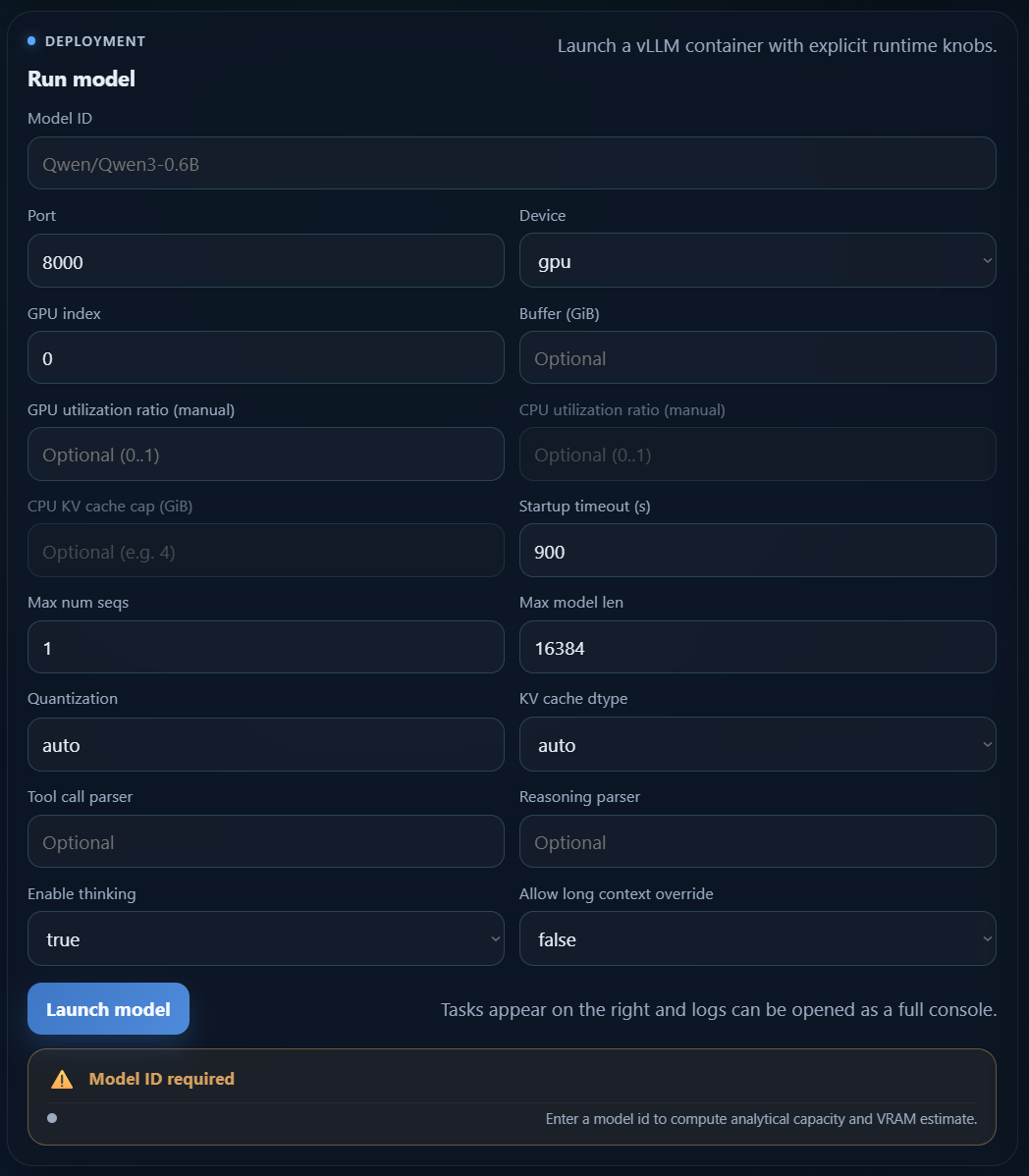
Form fields
Model ID: required Hugging Face model id. The launch button stays disabled until this field is filled.Port: host port exposed by the model API. The launch is blocked when the port is already used.Device:gpuorcpu.GPU index: NVIDIA GPU index used in GPU mode.Buffer (GiB): optional safety VRAM buffer.GPU utilization ratio (manual): optional manual GPU ratio. Disables automatic optimization for that launch.CPU utilization ratio (manual): optional CPU ratio limit.CPU KV cache cap (GiB): optional upper bound for CPU KV cache allocation.Startup timeout (s): maximum wait time before the launch is considered failed.Max num seqs: maximum number of parallel requests.Max model len: context length in tokens.Quantization: quantization strategy passed to vLLM.KV cache dtype: KV cache dtype used by the runtime.Tool call parser: optional parser for tool calling.Reasoning parser: optional parser for reasoning models.Enable thinking: enables or disables thinking mode.Allow long context override: advanced override when requested context exceeds the model limit.Trust remote code: allows custom model code from the Hugging Face repository. Leave it disabled unless you trust the model source.
Validation and estimate card
The Web UI validates the form before launch:
- the launch button is disabled when
Model IDis empty - the launch button is disabled when the selected port is already occupied
- the estimate card shows whether the current configuration is likely to fit available VRAM
This makes the Web UI the easiest way to test different runtime settings before starting a container.
Recommended workflow
- Start with
Model ID,Device,Port,Max num seqs, andMax model len. - Leave quantization and KV cache dtype on
autounless you have a specific reason to override them. - Enable
Trust remote codeonly for repositories you explicitly trust. - Use manual utilization ratios only when you want strict control over resource allocation.
- Watch the estimate card before clicking Launch model.
- After launch, follow the task logs to monitor Docker image pulls, Hugging Face downloads, and vLLM startup.